The ToolTwist platform: Designer, Workbench, and Controller
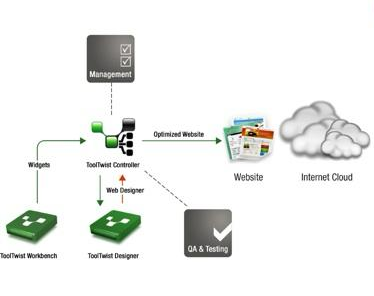
The ToolTwist platform has three parts: a Designer for the people who lay out pages, a Workbench for the developers who build the pieces, and a Controller that governs how everything reaches the live site. Together they let non-technical staff shape a website while keeping production safe behind version control and an approval workflow.
ToolTwist Designer
The ToolTwist Designer is the platform that lets non-technical people lay out and design websites. It allows a user to:
- Add widgets created with ToolTwist Workbench to web pages.
- Define how widgets are placed on a web page.
- Define the location of URLs or hyperlinks, the "navigation points" in web pages.
The Designer tools include a widget selector for choosing the widgets for a given page, a design tool to add and position them, a preview tool to view the page as built, an information tool that shows how widgets use navigation points across the site, and a navigation tool for defining the hyperlinks used by the pages created in the Designer.
ToolTwist Workbench
The ToolTwist Workbench is where your IT people work their magic. It is based on the industry-standard Eclipse IDE, so it is immediately familiar to most Java developers. An extensive, mature API assists developers with many common tasks and with integration into many common technologies and systems. Code generation and validation result in more reliable code than hand-written code development environments.
ToolTwist also provides a browser-based Workbench that simplifies common development tasks through meta data editors, code generators, and test harnesses. Tasks such as defining database schemas, creating and testing legacy system interfaces, and configuring menus can be performed from this workbench, which integrates with the Eclipse IDE. The workbench is also used to upload widgets and other code into the ToolTwist Controller. Once approved, they can then be used while designing pages, and from there proceed on into production.
ToolTwist Controller
The ToolTwist Controller is the watchdog of the production website. All website changes must be loaded into the ToolTwist Design Vault and pass through QA and an approval workflow before they can be deployed to the live site. The Controller automates and streamlines tasks that are usually manual and time-consuming, including:
- Version control.
- Configuration management.
- Workflows for QA and approval.
- Automatic deployment scheduling.
- Audit trail, logging, and back-tracking.
Setup and deployment to production servers is fully automated, usually without the need for the IT department to be involved.