ToolTwist Web Based Designer: when marketing owns the site
The ToolTwist Web Based Designer (TT-WBD) answers a question every marketing team has asked at least once: why does a simple page change have to wait for the IT department? With TT-WBD, the people who own the message also own the page. Developers build the reusable parts, and marketing assembles, lays out, and publishes the site from a browser.
The problem it was built to solve
Picture the old way of running a busy retail "mall" site. The boss wants change: a faster site, a more flexible site, something that keeps up with the competition. Then the everyday requests arrive.
Marketing needs the site layout changed. IT explains that the change needs code, so it has to be raised as a change request and scheduled, perhaps a week out. A product launch is coming and a new page is needed by the weekend, so everyone works long hours to hand-build it. The bottleneck was never a lack of ideas. It was that every presentation change had to pass through development.
The shift: marketing as the Site Presentation Owner
TT-WBD moves the presentation layer out of the release cycle. With the Web Based Designer, the marketing team can:
- Create a new, fully functional web page.
- Design and customise the page layout.
- Integrate marketing concepts and ideas directly, with ease.
- Fix most presentation and aesthetic issues themselves.
- Define site contents and navigation.
The result is a clean division of responsibility: marketing becomes the Site Presentation Owner, while development concentrates on the components and the platform underneath.
How a page reaches production
Designing a page is only half the story; getting it live safely is the other half. In TT-WBD, marketing designs pages in the Designer, then publishes them to a staging server. From there a page generation server continuously generates the site's pages and pushes them on to the production servers, keeping content up to date without a manual deploy each time. Dashboards cover both deployment and page generation, so the path from "designed" to "live" stays visible.
A useful analogy: building a house
It helps to think of building a site like building a house.
- Developers supply the materials. The IT team builds the widgets, the pre-built site sections, zones, and tools used to assemble pages.
- TT-WBD is the tools. The Web Based Designer is what you build with.
- Marketing brings the design and the concepts. Using the widgets, the marketing team designs the pages and then manages and maintains them across the mall sites.
Inside the Designer
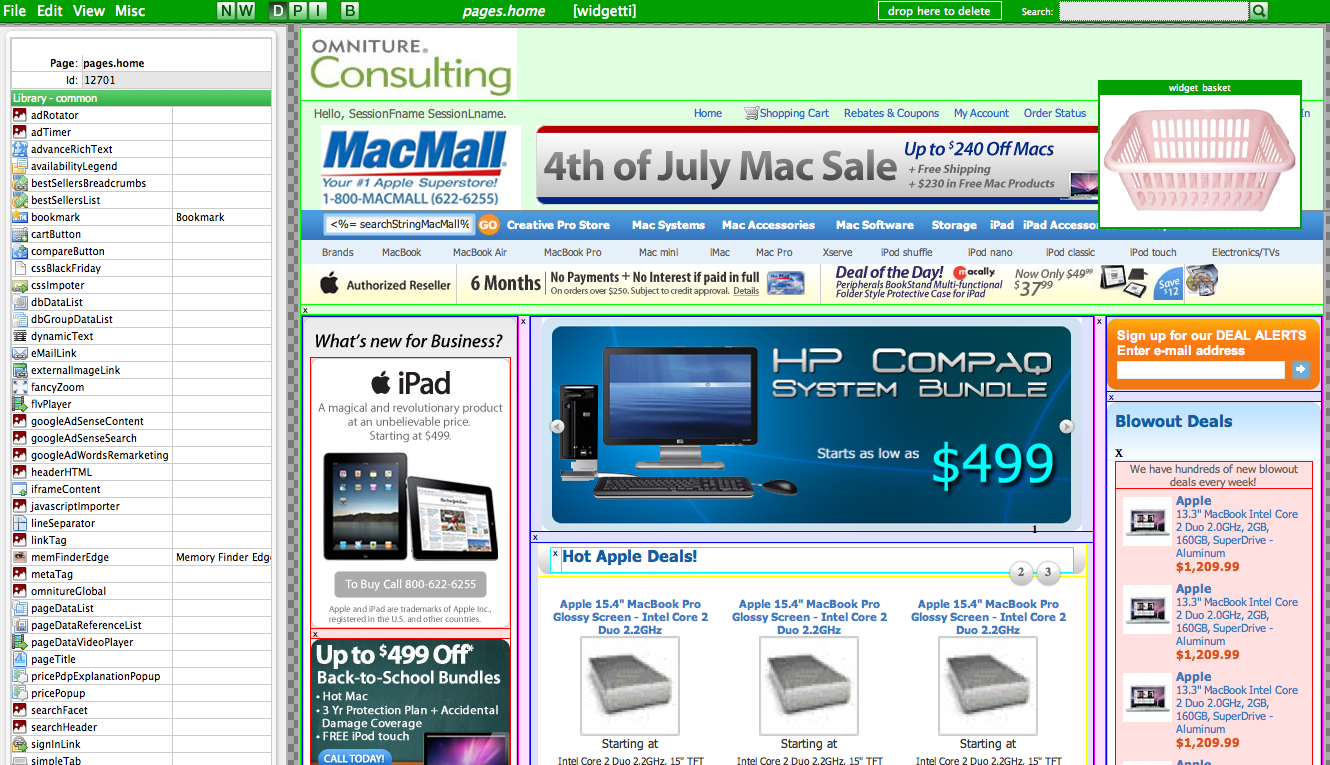
A closer look at TT-WBD shows the pieces a page builder works with: a navpoint editor for defining navigation, a widget selector for choosing components, the designer canvas itself, plus widget preview and widget information views, and a flow for creating a new page.
What are widgets? Reusable components used to create and modify web pages. Every page in TT-WBD is composed of widgets. They are organised into libraries, a folder structure that logically groups widgets so they are easy to find and reuse.
The core widgets give you the building blocks for a page:
- Page widget — the foundation of a web page; the base placeholder that holds the others.
- Zone widget — a reusable group of widgets; a placeholder for other widgets.
- Grid widget — lays out sections and defines where a particular widget sits.
- CropImage widget — creates cropped images.
- Frame widget — creates a bordered frame from an image.
- RichText widget — adds rich-text formatted captions and copy.
With these in hand, a marketing team can build a real page from scratch in minutes rather than waiting a week for a release. That was the whole point.